When audiences overlap, every segment looks the same
Most lead-generation accounts grow by stacking audiences. A campaign starts with one interest segment, someone adds two more that sound relevant, another campaign targets a similar group, and within a few months the same person qualifies for half the account. The ads still deliver and the leads still come in. What disappears is the ability to say which audience produced them.
That matters the moment you try to scale. When segments share an ad group or overlap across campaigns, the platform reports one blended cost per lead. Say one segment brings in parents at ₹550 a lead and another brings in casual browsers at ₹2,500. Blended, they average out to a number that looks acceptable, so both get more budget. The expensive segment grows with the cheap one, and cost per lead climbs with every rupee you add.
Audience choices can also backfire the other way, as we found when excluding existing buyers made Meta perform worse. The usual fix for a rising cost per lead is to cut budget or rotate creative. Neither touches the cause, because you can only cut a bad audience once you can see it.
The trap in one line
If your audiences overlap, a rising cost per lead is the account averaging your best segment with your worst, and adding budget feeds both.
Make every audience earn its budget
The loop turns a blurred account into one where each audience has to earn its budget, then uses the winners to build a sharper audience than any default segment Google offers.
The Adbuffs framework
The Search-to-Audience Loop
Step one. Separate. Give every audience segment its own ad group, so each one reports its own leads and its own cost per lead.
Step two. Test. Run the segments side by side on equal terms and judge them on cost per lead and lead volume, not clicks.
Step three. Mine. Take the search terms that the best segments’ leads actually used. These are proof of what your buyers look for.
Step four. Rebuild. Turn those terms into a custom segment, so Google finds more people who search the way your best leads did.
Cost per lead = spend ÷ leads
Efficiency check: if leads grow faster than spend, cost per lead must fall
Step four uses what Google now calls a custom segment. It used to be called a custom intent audience. You enter search terms, choose the option for people who searched for any of these terms on Google, and Google reaches people who searched for those or similar terms on its own properties, such as Search and YouTube. It is a modelled audience, not an exact list of searchers, which is why the inputs matter so much. Terms taken from leads that already converted give Google a far better starting point than terms a team guessed at.
This is the same principle behind rewriting Shopping titles from converting search terms: start from what your buyers already typed, not from what you assume they want.
What this looks like on a live account
Below is a children’s learning app we run in India that needed to grow lead volume without letting cost per lead run away. Its audience and interest segments overlapped across campaigns, so no one could say which were bringing in leads and which were absorbing spend. We split the account into audience-wise ad groups, tested segments such as Education and School against each other, and built a custom segment from the search terms behind the winners.
On these numbers
These are real Google Ads figures from an account we operate, covering April and May 2026, with the brand anonymised and the numbers unadjusted. A lead is the conversion the account was optimising for.
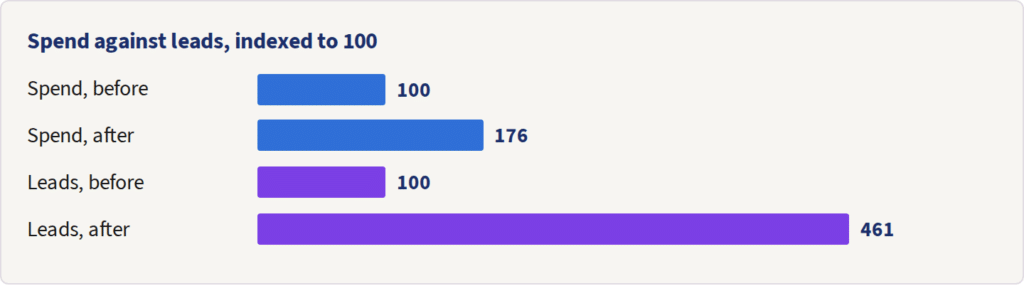
Account results . April to May 2026
The two growth rates are the result. Spend rose by about three-quarters, and leads rose to more than four and a half times their earlier level. Because cost per lead is spend divided by leads, that gap has only one outcome: each lead cost 61.9% less, ₹614 against ₹1,613. The numbers check out against each other, which is worth doing with any result someone shows you.
That is the difference between scaling a blur and scaling a signal. More budget into overlapping audiences would have bought more of the same average. More budget into separated, tested audiences went to the segments that had already shown they could produce leads cheaply.
Two segments did most of the work
Once every audience reported on its own, the account turned out to be far more concentrated than the blended numbers suggested. Two segments, the custom segment built from converting search terms and the Education segment, produced 74% of all leads, at ₹561 to ₹599 per lead.
Both segments ran below the account’s blended cost per lead, so the remaining quarter of leads came in at a higher price. That gap tells you where the next rupee should go and which segments to cap or cut, and it was invisible while the audiences overlapped.
The custom segment matters most here, because it is the one the account built rather than chose. A ready-made segment such as Education is a guess about who your buyers are. A segment built from the searches your buyers made is closer to a description of them, and in this account it became one of the two segments carrying acquisition.
Be honest about what this is
This is one account over two months, and several things changed at once: the account structure, the audiences and the budget. April and May also lead into school summer holidays in much of India, when demand for children’s learning apps can rise on its own. Leads growing more than four times faster than spend is strong evidence that the restructure drove the gain, but it is not a controlled result. A custom segment is a modelled audience, so its make-up can drift as Google updates it. To prove what the new audiences add, hold one out in a test region and compare, as we describe in The one number that tells you if you’re actually growing.
The terms, stated plainly
Running the loop on your own account
You can start the loop in a week. The test then needs enough leads per segment to read, which on most accounts means a few weeks.
- Map the overlap. List every audience segment in every campaign. Where the same segment, or two very similar ones, appear in more than one place, you have overlap.
- Give each audience its own ad group. One segment per ad group, with the same ads and bidding across them, so the only difference is the audience.
- Test on equal terms. Give each ad group enough budget to produce a readable number of leads, then compare cost per lead and lead volume.
- Find the concentration. Rank segments by share of leads and cost per lead. Usually two or three carry most of the account.
- Mine the winners’ search terms. Pull the search terms behind leads from your best segments and from your search campaigns, and keep the ones that converted.
- Build the custom segment. In Google Ads, create a custom segment from those terms using the option for people who searched for any of these terms on Google, and give it its own ad group.
- Move budget, then check the maths. Shift spend to the winners and cap the rest. If leads grow faster than spend, cost per lead will fall; if they do not, the segments are not as good as the test suggested.
- Prove it with a holdout. Pause the new custom segment in a test region and compare, so you know what it adds rather than what it is credited with.





 · Nov 10, 2026