A product name is not a search term
In a search campaign you choose the keywords. In Google Shopping you do not. Google reads your product feed and decides which searches each item is relevant to, and the title carries most of that weight. Whatever the title says is, in effect, your keyword list.
Most brands never write that list. The feed pulls product titles straight from the website, and website titles are written for people already on the site: a product name, sometimes a translated version of it, and the brand. That works on a product page. In a Shopping auction it means Google can only match the item to someone searching for that exact name.
The problem gets sharper when you sell abroad. An Indian brand selling Ayurvedic supplements in Germany had titles like “[Product name] ([German product name]) – [Brand]”. A German shopper looking for that kind of product types “ayurvedische Kräutertabletten” (Ayurvedic herbal tablets), searches an ingredient by its botanical name such as Withania somnifera, or describes what they want it to do. None of those words were in the title, so the listing rarely entered those auctions, and when it did, nothing in it told the shopper why to click.
The trap in one line
If your Shopping title only says what you call the product, Google can only show it to people who already know that name, and those people were going to find you anyway.
The Adbuffs Search-Matched Title
The fix is to write the title from the search, not from the catalogue. We use the brand’s own Shopping search-terms data as the starting point, because a term that already converts is proof of demand, then fill the gaps with keyword research in the market’s language.
The Adbuffs framework
The Search-Matched Title
Rule one. Start from what converts. Pull the Shopping search terms that already produce sales and build the title around their words, not around the product name.
Rule two. Write in the shopper’s language. Translating the catalogue is not enough. Use the words local shoppers type, including botanical or technical names where that is how they search.
Rule three. Say what it is, what is in it and what it does. Product type, key ingredient and benefit each get a place in the title, with pack size where buyers compare on it.
Search-Matched Title = product name + pack size | product type in plain local language | key ingredient as shoppers search it | benefit or use
Here is how that reads on the two products in this post. The brand and product names are anonymised; the German descriptive parts are the real titles.
Website title against Search-Matched Title
In English, the first new title reads “Ayurvedic iron supplement for women | pearl oyster and Ayurvedic herbs | dietary supplement”, and the second “Ayurvedic fruit-and-herb preparation | amla (amalaki)”. Every segment matches a way people actually search for the product.
Descriptions get the same treatment, with more room: the full ingredient list and where it is sourced, the traditional Ayurvedic context, dosage and usage, and certifications such as lab-tested, vegan, gluten-free or organic. The rewritten titles and descriptions went into a custom feed, so the website kept its own product names and the feed could be tested against them.
What this looks like on a live account
Below are two products from an Ayurvedic supplement brand we run in Germany. For each one, the original website title and the Search-Matched Title ran as separate listings in the same Shopping campaigns over the same dates, so both competed in the same auctions under the same conditions.
On these numbers
These are real Google Ads figures from an account we operate, with the brand and product names anonymised and the numbers unadjusted. Both versions of each product ran over the same period, which rules out seasonality and month-to-month auction changes as the explanation. The volumes are small: each listing recorded between two and three conversions and somewhere between 16 and 50 clicks. Read the direction, not the decimal places.
Women’s iron supplement, May 2026 . price €29.99
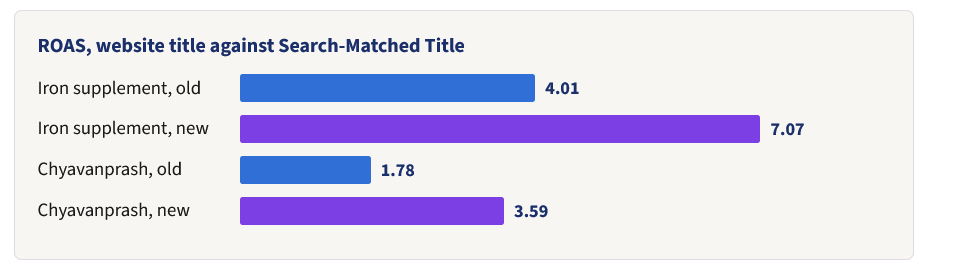
More people clicked the new title, and a far larger share of them bought. Conversion rate rose from 7.42% to 13.19% and each customer cost €5.51 less to acquire. The rewritten listing brought in slightly more conversion value on about a third less spend.
Chyavanprash 450 g, June 2026 . price €29.99
The second product is the more interesting one, because the click-through rate went the wrong way. Fewer people clicked, and yet conversion rate rose from 6.19% to 8.01%, ROAS doubled and the listing brought in 15% more conversion value while spending 43% less. That pattern is worth its own section.
We then raised the budget behind a third rewritten listing, an Ayurvedic Brahmi product, and its monthly sales went from €134 to €460. That one is a budget result as much as a title result, so we read it only as a sign that the new listing held up when more money went behind it.
A lower CTR can be the better result
Most Shopping reports put click-through rate near the top, and most people read a falling CTR as a problem. On a Shopping ad, though, every click is paid for. A vague title invites curious browsers to click, and you pay for each of them. A precise title tells the shopper exactly what the product is before they click, so the people who were never going to buy scroll past for free.
That is what the chyavanprash numbers show. The descriptive title made the listing less attractive to people looking for something else and more convincing to people looking for exactly this, which is why clicks fell, conversion rate rose and spend dropped while conversion value grew. Judge a title on conversion rate, cost per conversion and ROAS. CTR tells you how many people were curious, not how many were buying.
Be honest about what this is
These are two products in one market, and each listing recorded only two to three conversions. At that volume one extra order moves conversion rate by several points, so the size of each gain is not reliable even though the direction held on both products. Running both titles over the same dates removes seasonality from the comparison, but Google decides which listing to show in each auction, so traffic was not split at random the way a controlled A/B test would split it. Before rolling Search-Matched Titles across a whole catalogue, run them on your top sellers for four to six weeks and check the same metrics on real volume.
The terms, stated plainly
Running it on your own feed
You can test this on a handful of products in a week. The work is in the research and the writing, not in the setup.
- Pick your top sellers. Start with five to ten products that already get Shopping traffic, so the comparison builds volume quickly.
-
Pull the converting search terms. In Google Ads, open the search terms report for your Shopping campaigns, filter to terms with conversions, and group them by product.
-
Research in the market’s language. Fill the gaps with keyword research by someone who speaks the language natively. Note the ingredient names, product types and benefit phrases shoppers actually use.
-
Write the title. Product name and pack size, then product type, key ingredient and benefit, separated cleanly. Google allows up to 150 characters, but shoppers often see only the start, so put the words that win the click first.
-
Rewrite the description. Ingredients and sourcing, how to use it, and certifications. For food supplements sold in the EU, have benefit wording checked against the EU rules on health claims before it goes live.
-
Load it as a custom feed. Keep the website’s product titles unchanged and give Shopping its own title and description fields in Merchant Center.
-
Run both titles at once and compare on the right metrics. Keep the original listing live alongside the new one over the same dates, then compare conversion rate, cost per conversion and ROAS. Do not kill a title because its CTR fell.
-
Wait for volume. Give each test four to six weeks or enough conversions to trust before rolling the format across the catalogue.





 · Nov 10, 2026